
-

-
Restorer Ultimate Documentation
- Contents
- Index
- Introduction to Restorer Ultimate
- Restorer Ultimate Main Panel, Settings, and Log
- Images and Regions
-
File Recovery
- Recover Files from Existing Logical Disks
- Recover Files from Deleted/Corrupted Logical Disks and Partitions
- Disk Scan
-
Data Recovery from Volume Sets and RAIDs
- Spanned Volumes, Stripe Sets, and Mirrors
- Basic RAID 4 and RAID 5
- RAID 6 Reed-Solomon Presets
- RAID6 (Double Xor) Presets
- RAIDs with Parity Delays
- Advanced RAID Layouts
- Nested and Non-Standard RAID Levels
- Finding RAID Parameters
- Checking RAID Consistency
- Syntax of a Description File for RAID Configurations
- Description Files for RAID Configurations
- Various Disk and Volume Managers
- Data Recovery over Network
- Text/hexadecimal Editor
- Technical Information
© 2020 BitMart Inc.
All rights reserved.
File Masks
Restorer Ultimate shows only those files/folders that match the specified file mask. File mask affects files/folders that are processed by the Recover and Find commands.
You may quickly set two file mask presets on Task List : Show All Files and Show Deleted Files , or set a more complex file mask.
To specify a file mask,
| 1 | Click Set files mask on Task List->Actions |
| 2 | Specify the file mask on the File mask dialog box and click the OK button |
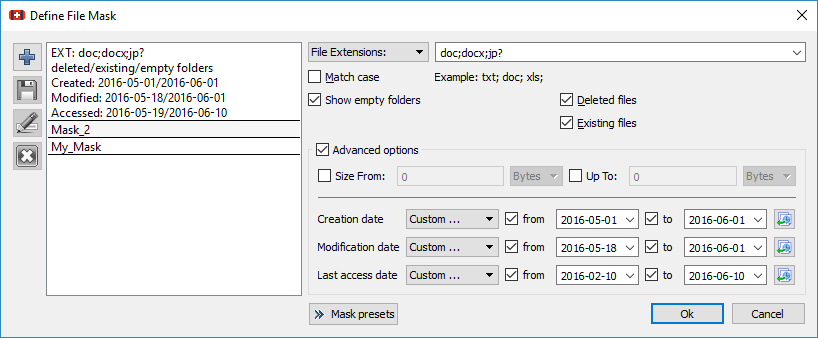
Mask dialog box
 File mask options
|
You may specify options for All Files , File Extensions , File Masks , and Regular Expressions |
|
|
Match case |
If this check box is selected, Restorer Ultimate makes a case-sensitive search. |
|
Show empty folders |
If this check box is selected, Restorer Ultimate will show folders with no files matching the mask. |
|
Deleted files |
If this check box is selected, Restorer Ultimate makes a search among deleted files/folders. |
|
Existing files |
If this check box is selected, Restorer Ultimate makes a search among existing files/folders. |
|
Advanced Options |
|
|
Size from/up to |
Specifies file size limits. See the Data Formats and Multipliers topic for more details on data formats. |
|
Date |
Specifies file date boundaries. Dates for Modified, Created, and Last Accessed timestamps may be set separately. The Set for all button sets the specified data for all fields |
|
|
The Set for all button sets the specified data for all fields. |

| > | Restorer Ultimate will show only those files that match the specified file masks |
Mask presets
You may set various presets with different file masks. Just click on the Plus button to add the data from the dialog box to the presets. You may also give presets names, delete them, and store them permanently.