
-

-
Restorer Ultimate Documentation
- Contents
- Index
- Introduction to Restorer Ultimate
- Restorer Ultimate Main Panel, Settings, and Log
- Images and Regions
-
File Recovery
- Recover Files from Existing Logical Disks
- Recover Files from Deleted/Corrupted Logical Disks and Partitions
- Disk Scan
-
Data Recovery from Volume Sets and RAIDs
- Spanned Volumes, Stripe Sets, and Mirrors
- Basic RAID 4 and RAID 5
- RAID 6 Reed-Solomon Presets
- RAID6 (Double Xor) Presets
- RAIDs with Parity Delays
- Advanced RAID Layouts
- Nested and Non-Standard RAID Levels
- Finding RAID Parameters
- Checking RAID Consistency
- Syntax of a Description File for RAID Configurations
- Description Files for RAID Configurations
- Various Disk and Volume Managers
- Data Recovery over Network
- Text/hexadecimal Editor
- Technical Information
© 2020 BitMart Inc.
All rights reserved.
File Recovery on a Remote Computer
(Available on Restorer Ultimate PRO Network only)
You need to connect Restorer Ultimate to the remote computer to start recovering files over network.
Read the Connecting over the Internet topic to learn how to establish connection between Restorer Ultimate and Remote Engine over the Internet.
To connect to a remote computer
| 1 | Click Actions->Connect to Remote on task List |
A list of nearby computers will appear in the Computer List on the Connect to Remote Computer dialog box.
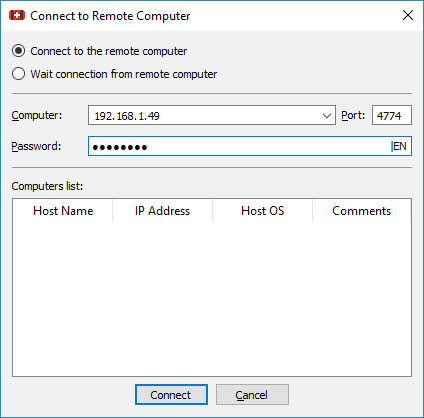
Connect to Remote Computer dialog box
| 2 | Select a computer from the list on the Connect to Remote Computer dialog box and enter the password |
Otherwise, you need to specify in the Computer: field the name or IP address of the remote computer where data are to be recovered. The Port should coincide with the port specified for the Restorer Ultimate Remote Engine
The Password: field is for the password of Restorer Ultimate Remote Engine running on the remote computer.
Note: If the remote computer is started with Restorer Ultimate Emergency Remote Engine , leave this field blank.
| > | Restorer Ultimate will connect to the remote computer and show its hard drive and logical disk structure of the remote computer below the device/disk structure of your local computer |
It can be processed the same way as that on a local computer.
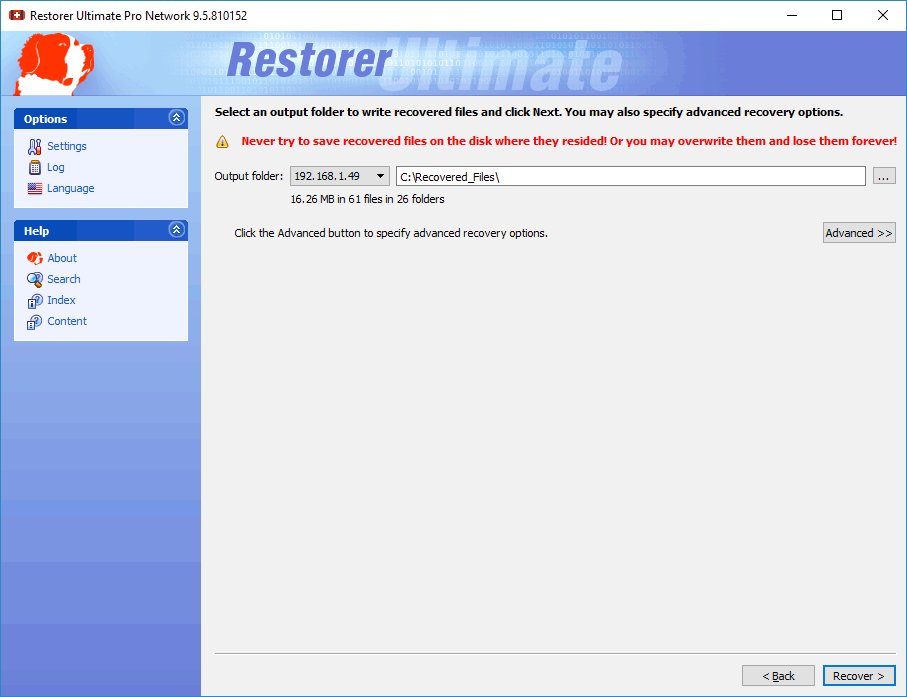
Recovery options panel
When the Recover dialog box appears, you may select whether you want to save recovered files on the local or remote computer. Saving recovered files on a remote computer may be useful when the remote computer has a healthy disk because you do not have to transfer files over network. It may be an external USB hard drive, for example.
To disconnect from a remote computer
| * | Right-click the Remote Computer object and select Delete on the shortcut menu, |
or select the Remote Computer object and press the F8 key.