
-

-
Restorer Ultimate Documentation
- Contents
- Index
- Introduction to Restorer Ultimate
- Restorer Ultimate Main Panel, Settings, and Log
- Images and Regions
-
File Recovery
- Recover Files from Existing Logical Disks
- Recover Files from Deleted/Corrupted Logical Disks and Partitions
- Disk Scan
-
Data Recovery from Volume Sets and RAIDs
- Spanned Volumes, Stripe Sets, and Mirrors
- Basic RAID 4 and RAID 5
- RAID 6 Reed-Solomon Presets
- RAID6 (Double Xor) Presets
- RAIDs with Parity Delays
- Advanced RAID Layouts
- Nested and Non-Standard RAID Levels
- Finding RAID Parameters
- Checking RAID Consistency
- Syntax of a Description File for RAID Configurations
- Description Files for RAID Configurations
- Various Disk and Volume Managers
- Data Recovery over Network
- Text/hexadecimal Editor
- Technical Information
© 2020 BitMart Inc.
All rights reserved.
Restorer Ultimate Remote Engine
(Available on Restorer Ultimate PRO Network only)
You need to run Restorer Ultimate Remote Engine on a remote computer to provide access to its disks.
Attention Windows NT/2000/XP/2003 users: Restorer Ultimate Remote Engine should be started under an administrator account.
 The following switches are available:
|
-? |
evokes a help screen; |
|
-install |
installs Restorer Ultimate Remote Engine as a service |
|
-remove |
removes Restorer Ultimate Remote Engine services |
|
-console |
starts Restorer Ultimate Remote Engine as a console application |

Restorer Ultimate Remote Engine main panel
To configure Restorer Ultimate Remote Engine
| 1 | Select Configure on the File menu |
| 2 | Specify required parameters on the Configuration dialog box and click the OK button |
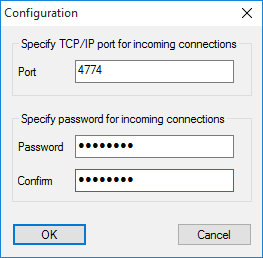
Configuration dialog box
Restorer Ultimate Remote Engine Options
|
Password: |
Enter a password to obtain access to this computer from a network. |
|
Confirm: |
Re-enter the password. |
|
Port |
port for incoming connections |
| > | Restorer Ultimate Remote Engine will now run with the specified parameters |