
-

-
Restorer Ultimate Documentation
- Contents
- Index
- Introduction to Restorer Ultimate
- Restorer Ultimate Main Panel, Settings, and Log
- Images and Regions
-
File Recovery
- Recover Files from Existing Logical Disks
- Recover Files from Deleted/Corrupted Logical Disks and Partitions
- Disk Scan
-
Data Recovery from Volume Sets and RAIDs
- Spanned Volumes, Stripe Sets, and Mirrors
- Basic RAID 4 and RAID 5
- RAID 6 Reed-Solomon Presets
- RAID6 (Double Xor) Presets
- RAIDs with Parity Delays
- Advanced RAID Layouts
- Nested and Non-Standard RAID Levels
- Finding RAID Parameters
- Checking RAID Consistency
- Syntax of a Description File for RAID Configurations
- Description Files for RAID Configurations
- Various Disk and Volume Managers
- Data Recovery over Network
- Text/hexadecimal Editor
- Technical Information
© 2020 BitMart Inc.
All rights reserved.
Regions
Processing large object may take a long time. Sometimes, only a smaller area of a disk needs to be scanned or searched for files. Such area is called a region . A region can be created on any object in the Restorer Ultimate 's Device/Disk list.
Created regions can be scanned, and files on them can be recovered in the same way as from hard drives or logical disks.
Created regions can be deleted.
Note: Restorer Ultimate does not create anything real on the disk. Regions are virtual objects that do not affect actual data on the disk.
To create a region
| 1 | Right-click the object on the Device/Disk list and select Create Region on the shortcut menu, |
or select the object and press the F4 key.
| 2 | Specify region parameters on the Create Region dialog box |
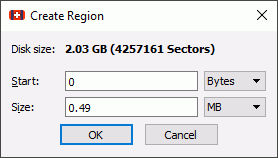
Create region dialog box
 Region options
|
Disk size: |
Shows size of the object where the region is to be created. The region cannot be larger than this size. |
|
Start: |
Start point of the region |
|
Size: |
Size of the region. Cannot be larger than Disk size . |
|
Numbers in these fields can be in bytes or sectors. See the Data Formats and Multipliers topic for more details on data formats. |
|
| > | A Region object will appear on the Device/Disk list |
You may perform all data recovery actions, including file search, scan, and recovery from this region as it were a real device/disk object.
To delete a region,
| * | Right-click the region and select Delete on the shortcut menu, |
or select the image object and press the F8 key.