
-

-
Restorer Ultimate Documentation
- Contents
- Index
- Introduction to Restorer Ultimate
- Restorer Ultimate Main Panel, Settings, and Log
- Images and Regions
-
File Recovery
- Recover Files from Existing Logical Disks
- Recover Files from Deleted/Corrupted Logical Disks and Partitions
- Disk Scan
-
Data Recovery from Volume Sets and RAIDs
- Spanned Volumes, Stripe Sets, and Mirrors
- Basic RAID 4 and RAID 5
- RAID 6 Reed-Solomon Presets
- RAID6 (Double Xor) Presets
- RAIDs with Parity Delays
- Advanced RAID Layouts
- Nested and Non-Standard RAID Levels
- Finding RAID Parameters
- Checking RAID Consistency
- Syntax of a Description File for RAID Configurations
- Description Files for RAID Configurations
- Various Disk and Volume Managers
- Data Recovery over Network
- Text/hexadecimal Editor
- Technical Information
© 2020 BitMart Inc.
All rights reserved.
Restorer Ultimate Main Panel, Settings, and Log
When Restorer Ultimate starts, its Device/Disk list panel appears. Click the panel regions to learn their functions.
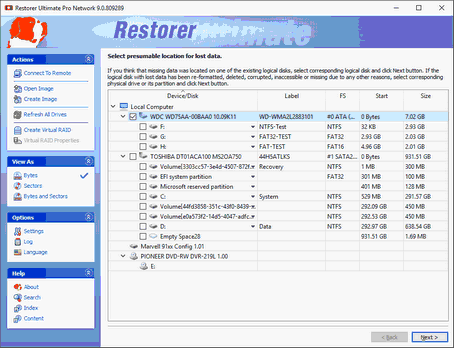
On the Task List->View As menu you may select the units in which object's start and size are displayed.
You may select
|
Show as Bytes |
|
Show as Sectors |
|
Show as Bytes and Sectors |
Depending on the task Restorer Ultimate performs, its panel may vary. Those panels are described in appropriate topics.
Changing the program language
You may select the language of Restorer Ultimate main panel and its help. To do so, select an available language on the Language item on the Options menu. Or you may go to the About item on the Help menu and click the Language button.
S.M.A.R.T. Info for a Hard Drive
Restorer Ultimate shows hard drive S.M.A.R.T. states using their icons.

|
Normal : This state indicates that the hard drive is in good conditions. |
|
|
Warning: This state indicates that some small problems with the disk are possible in the future, you may work with it but with cautions and regular check of these parameters. Disk imaging is strongly recommended. |
|
|
Critical: This state indicates that the hard drive conditions are critical and chances of hardware failure are great. The best recommendation for this case is to stop working with the disk and bring it to professional data recovery specialists. You may though continue to work with the disk at your own risk, but Disk imaging is very strongly recommended. |
|


You may check the hardware conditions of a drive by viewing its S.M.A.R.T data. See the S.M.A.R.T. data topic for more details.
S.M.A.R.T. (Self-Monitoring, Analysis and Reporting Technology) is a technology widely-used in hard drives and solid-state devices that monitors their reliability conditions to predict possible hardware failures.
Logging : Log window
Configuring : the Settings dialog box.