
-

-
Restorer Ultimate Documentation
- Contents
- Index
- Introduction to Restorer Ultimate
- Restorer Ultimate Main Panel, Settings, and Log
- Images and Regions
-
File Recovery
- Recover Files from Existing Logical Disks
- Recover Files from Deleted/Corrupted Logical Disks and Partitions
- Disk Scan
-
Data Recovery from Volume Sets and RAIDs
- Spanned Volumes, Stripe Sets, and Mirrors
- Basic RAID 4 and RAID 5
- RAID 6 Reed-Solomon Presets
- RAID6 (Double Xor) Presets
- RAIDs with Parity Delays
- Advanced RAID Layouts
- Nested and Non-Standard RAID Levels
- Finding RAID Parameters
- Checking RAID Consistency
- Syntax of a Description File for RAID Configurations
- Description Files for RAID Configurations
- Various Disk and Volume Managers
- Data Recovery over Network
- Text/hexadecimal Editor
- Technical Information
© 2020 BitMart Inc.
All rights reserved.
Settings
Restorer Ultimate settiongs may be specified on the Settings dialog box. To reach this box, click Options -> Settings on the Task List .
Main

Main dialog box
|
System Options |
|
|
Enable Write |
If this check box is selected, Restorer Ultimate enables you to write any changes made in the Text/Hexadecimal Editor . |
|
Auto-refresh Drive Tree |
If this box is selected, Restorer Ultimate automatically refreshes the list of connected disks. You may disable it if Restorer Ultimate experiences problems with connected devices. |
|
Debug Mode |
If this check box is selected, Restorer Ultimate displays an additional command Create FS Snapshot on the shortcut menu for an object with a file system. An FS Snapshot contains system data for the file system only (file descriptions without file contents). If a problem appears, this snapshot can be sent to Restorer Ultimate technical support to identify the problem. This option greatly slows Restorer Ultimate . |
|
Notifications |
|
|
Reset all hidden notifications |
This button enables all previously disabled notification and warning messages. |
|
User's file types |
|
|
File name |
Specifies a file name and path to the file where the descriptions of user's known file types are stored. You need to re-start Restorer Ultimate or click the Reload User's File Types button on the Known File Types tab for the new file to take effect. |
|
User's RAID layout |
|
|
File name |
Specifies a file name and path to the file where the descriptions of user's RAID layouts are stored |
|
User's file mask presets |
|
|
File name: |
Specifies a file name and path to the file with file mask presets. |
File Systems
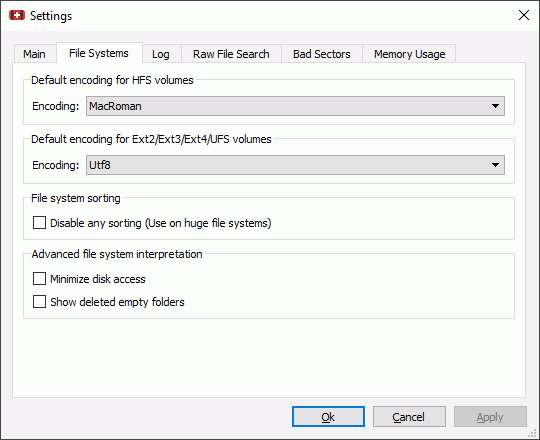
File Systems dialog box
|
Default encoding for HFS volumes |
Select the national encoding for the HFS partitions. |
|
Default encoding for Ext2/Ext3/Ext4/UFS volumes |
Select the national encoding for the Ext2, Ext3, Ext4, and UFS partitions. |
|
Disable any sorting |
Select this option if the number of files on the disk is so large that Restorer Ultimate sorts files in selected folders for too long time. |
|
Minimize disk access |
Select this option if a lot of bad sectors are on the hard drive. Restorer Ultimate will reduce access to internal files in the file system to speed up the interpretation of file system data. |
|
Show deleted empty folders |
Select this option if you want to view empty deleted folders. |
Log
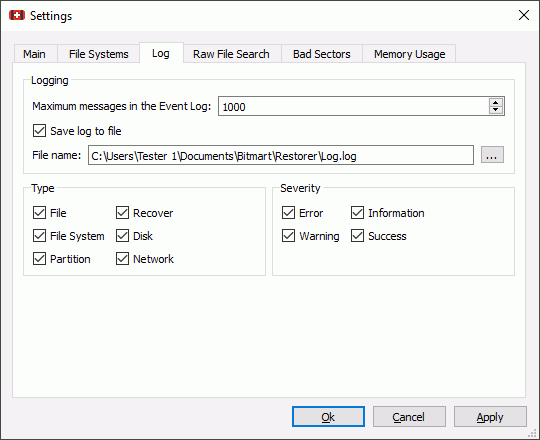
Log dialog box
 Log options
|
Type |
|
|
File |
If this check box is selected, Restorer Ultimate logs all events with recovered files. |
|
File System |
If this check box is selected, Restorer Ultimate logs all events with the file system. |
|
Partition |
If this check box selected, Restorer Ultimate logs all events with partitions. |
|
Recover |
If this check box is selected, Restorer Ultimate logs all events with the recovering processes. |
|
Disk |
If this check box is selected, Restorer Ultimate logs all events with disks. |
|
Network |
If this check box is selected, Restorer Ultimate logs all events with network operation. |
|
Severity |
|
|
Error |
If this check box is selected, Restorer Ultimate adds error messages into its log. |
|
Warning |
If this check box is selected, Restorer Ultimate adds warning messages into its log. |
|
Information |
If this check box is selected, Restorer Ultimate adds information messages into its log. |
|
Success |
If this check box is selected, Restorer Ultimate adds success messages into its log. |
|
NEVER WRITE A LOG FILE ON THE DISK FROM WHICH YOU RECOVER DATA!!! Or you may obtain unpredictable results and lose all your data. |
|
|
Save log to file |
If this check box is selected, Restorer Ultimate writes its log into a log file specified in the File location: field. |
|
Rewrite/Append |
Select it if you want to rewrite a log file, or append log information to this file. |
|
Save as |
You may select the encoding for the log file. You may select ANSI , UNICODE , or UTF8 . |
|
Note: If in the Recover dialog box the Condense successful restoration events check box is selected, the Log will display only Error , Warning , and Information event messages. |
|
Raw File Search
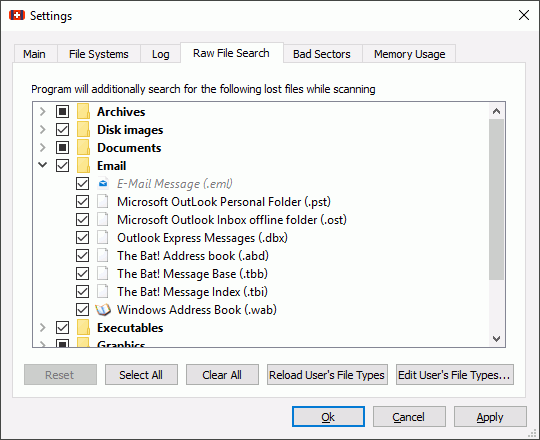
Raw File Search dialog box
You may specify which files will be enabled/disabled by default.
Bad Sectors
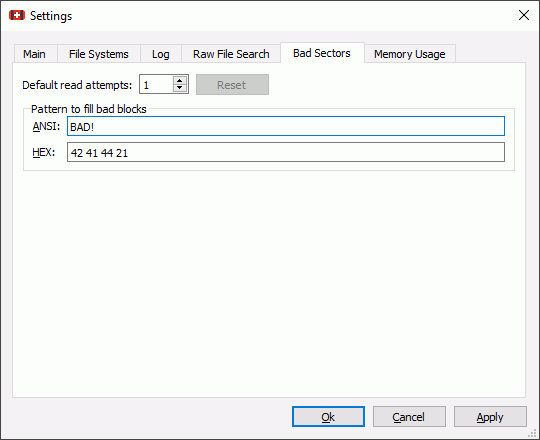
Bad Sectors dialog box
|
Default read attempts |
Specifies a default value for I/O Tries , or how many times Restorer Ultimate will try to read a bad sector. Restorer Ultimate treats bad sectors in the following way: It reads a certain part of disk (predefined by Windows) and • If Default read attempts is set to 0, the entire part with bad sectors will be filled with the specified pattern. • If Default read attempts is set to a non-zero value, Restorer Ultimate reads again that part sector by sector, repeating the attempts the specified number of times. If Restorer Ultimate still cannot read a bad sector, it fills the sectors with the specified pattern. In this case only the bad sectors will be filled with the pattern, but that extremely slows the disk read process. For example, if you set Default read attempts to 1, a bad sector will be read 2 times. |
|
Pattern to fill bad blocks |
Specifies a pattern Restorer Ultimate will use to fill bad sectors in files to recover, in images, or when showing data in the Text/Hexadecimal Editor . You may specify the pattern either in the ANSI or Hex data format. Note: Restorer Ultimate will never ever try to write anything on the disk from which data is to recover or an image is to create. |
Memory Usage
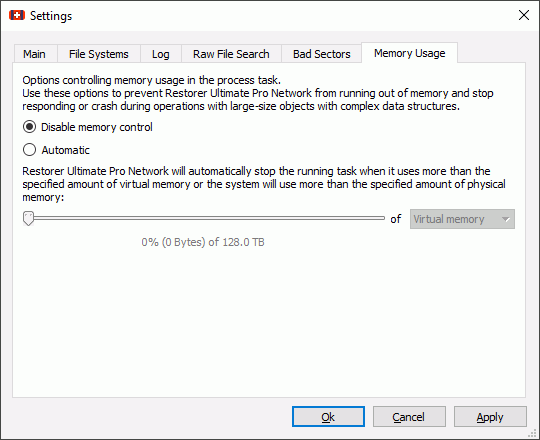
Memory Usage dialog box
|
Disable memory control |
Disables the memory control. If Restorer Ultimate consumes too much memory during processing a huge file system, the program may become unstable or even freeze. |
|
Automatic |
Enables automatic memory usage control. When the memory usage reaches the specified amount, Restorer Ultimate will begin file enumeration in parts. |